Home Weather Station Basics: Sensors, Setup, and Calibration
If you want weather data that truly reflects conditions around your home, a basic personal weather station can provide it. This guide walks through sensor placement, temperature and humidity tracking, rain gauge and wind setup, calibration, and keeping a clear daily weather data log.
What a Home Weather Station Does
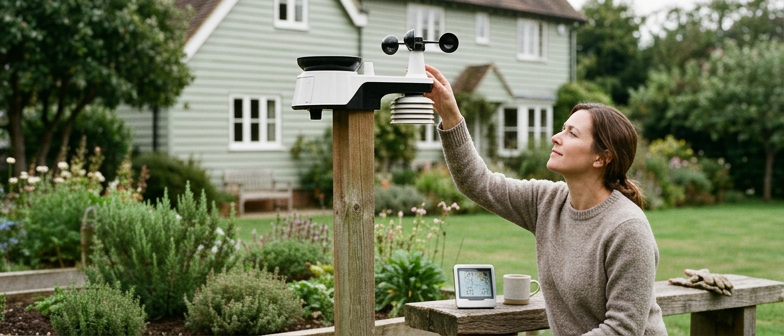
A home weather station is a compact system for tracking local atmospheric conditions so you can see how the weather behaves exactly where you live. It focuses on Home Weather Station Basics such as temperature and humidity tracking indoors and outdoors, showing how your rooms respond to changing seasons, sunlight, and ventilation. Current readings often appear on a console or app, along with daily high and low values, helping you notice warm or cool spots, persistent dampness, and large day–night temperature swings.
More advanced setups add wind speed measurement and simple tools for keeping a daily weather data log over weeks or longer. Wind sensors reveal how breezy or gusty your location is, affecting gardening plans and outdoor comfort. Data logging features store regular observations and display them as graphs or tables, so you can compare one day or season with another. By combining temperature, humidity, wind, and other readings in one system, a home station gives a clearer picture of your immediate environment and a personal record of local weather.
Placing Sensors Around Your Home
Weather sensor placement is central to home weather station basics, because every instrument’s position affects accuracy. Install sensors where they capture the true outdoor environment, not heat or turbulence from your home. Prefer open areas with steady airflow and minimal shifting shade, and keep instruments away from walls, roofs, and paved surfaces that store heat. Plan routes for cables or power and leave room for maintenance so you do not need to relocate equipment and disrupt long term records.
For temperature and humidity tracking, choose a garden or open yard instead of a balcony or tight passage. Mount the probe at a moderate height, protected from direct sun, artificial heat, and dripping gutters. Use the manufacturer’s radiation shield if provided, and avoid bare concrete or asphalt that warms the air and distorts readings. Good placement of these sensors keeps measurements stable and makes them more useful for everyday decisions based on local conditions.
Rain gauge setup and wind speed measurement also depend on clear exposure. Place the rain gauge level in an open spot, high enough to avoid ground splash yet low enough for easy cleaning, and away from branches, fences, and buildings that block rainfall. Mount wind instruments as high as safely possible on a mast or rooftop, with separation from chimneys, roof peaks, and trees that disturb airflow. Careful positioning helps keep your daily weather data log consistent and supports reliable weather station calibration.
| Sensor Type | Recommended Location | Key Obstacle To Avoid | Exposure Quality | Maintenance Access |
|---|---|---|---|---|
| Temperature | Open garden over natural ground | Nearby walls and paved surfaces | Moderate height, shaded, well ventilated | Easy reach for shield cleaning |
| Humidity | Uncluttered yard with steady airflow | Balconies, passages, exhaust vents | Protected from direct sun and heat | Simple access for periodic checks |
| Rain Gauge | Level, open area in the yard | Overhanging trees and roof splash | Horizontal rim, minimal wind disturbance | Convenient for debris removal |
| Wind Sensor | Safe mast or rooftop mount | Chimneys, roof peaks, tall trees | High, unobstructed airflow | Accessible with careful ladder use |
Good Practices for Temperature and Humidity Sensors
To keep temperature and humidity tracking representative of the surrounding air, mount sensors in a ventilated radiation shield, several feet above natural ground rather than over concrete or asphalt. Shield them from direct sun, reflected heat, and radiating surfaces, and avoid nearby walls, roofs, vents, outdoor lighting, and exhaust fans that warm the air. For reliable weather sensor placement, prioritize open, unobstructed airflow from all directions so local air conditions, not nearby structures, control the readings.
For accurate humidity readings, minimize nearby sources of artificial moisture. Avoid positioning the sensor above heavily irrigated lawns, garden beds, or pools, and keep clear of dryer vents, kitchen exhausts, and greenhouse openings where evaporation is high. If installation near a building is unavoidable, use the shadiest, most ventilated area and keep distance from frequently opened windows and doors. Inspect the shield and mounting regularly for dirt or debris that restrict airflow, because poor circulation can still cause the sensor to drift from actual conditions.
Measuring Rainfall and Wind at Home
For a home weather station, rainfall is measured with a carefully positioned rain gauge, usually using a tipping bucket that records each small increment of water. Good rain gauge setup keeps the gauge level, the rim horizontal, and the collector away from splashes off roofs, walls, or hard surfaces. Mount it high enough to avoid debris, but not so high that wind alters how rain enters the opening. Regular checks for leaves, dirt, or insects and gentle cleaning help avoid underestimating totals and keep daily measurements consistent.
Wind speed measurement at home typically relies on cup or propeller anemometers and a wind vane for direction. Accurate readings depend on thoughtful weather sensor placement so that airflow is not blocked. Wind instruments work best above roof level and away from trees, chimneys, and nearby buildings that create turbulence or sheltered zones. Many home users mount a mast on a rooftop or in an open yard, then accept that local obstacles can cause differences from official observations. Keeping the anemometer secure, level, free to rotate, and checking for wear, ice, or dirt improves long term reliability.
Because home sites rarely meet professional standards, rainfall and wind data often show small biases or irregularities. You can improve consistency by keeping placement stable, noting any changes to mounting height or surroundings, and recording unusual events such as severe storms that might distort readings. Comparing your rainfall totals and wind speeds with nearby official stations can reveal whether your setup tends to run high or low without forcing an exact match. Over time, careful siting, routine maintenance, and simple cross checks make your home measurements more dependable for everyday tracking and your long term weather log.
Setting Up a Rain Gauge Correctly
A careful rain gauge setup is essential for reliable Home Weather Station Basics. Place the gauge in an open, level area away from roofs, trees, fences, and walls so rainfall is not blocked or funneled into the collector. The top should sit above nearby surfaces that might cause splashing, yet not so high that wind dominates. Keep the instrument vertical and stable, using a spirit level or built‑in markings to ensure the rim stays truly horizontal, because even small tilts can change totals and affect long‑term Rain Gauge Setup results. Once installed, enter readings into your Daily Weather Data Log and compare each day’s rainfall with local patterns or other sensors on your property. Sudden zeros during rainy periods may signal clogging, while unusually high values can indicate runoff from nearby structures.
Calibration and Ongoing Checks
In Home Weather Station Basics, calibration means keeping each sensor aligned with realistic values for temperature, humidity, wind and other measurements. Most home stations are roughly calibrated at the factory, but readings can drift or be affected by how and where the system is installed. Simple checks are usually enough: you confirm that temperature and humidity tracking, wind speed measurement and other data stay within reasonable ranges when compared with your own observations and with trusted nearby sources.
For temperature and humidity, compare your station with a nearby official or well sited reference, remembering that small differences in siting or elevation can cause minor variation. If temperatures or moisture levels are consistently too high or low and you have ruled out issues such as direct sun or poor airflow, review any offset or correction options in the device settings. Routine visual checks, like confirming that the shield is clean and sensors are unobstructed, support reliable readings and reduce the need for more involved weather station calibration.
Wind speed measurement and other moving parts need occasional attention. Compare your wind data with regional reports and look for persistent, large differences rather than focusing on single gusts. If anemometer cups or the vane are dirty, worn or blocked, gentle cleaning and confirming free motion can improve accuracy. By repeating brief comparisons and inspections over time, your daily weather data log more closely reflects actual conditions and your home station becomes more dependable for tracking local patterns.
Q&A
-
What are the basic functions of a home weather station?
It tracks local conditions such as temperature, humidity, rainfall, and wind, often indoors and outdoors, and shows current, high, and low values on a console or app. -
How should I place outdoor weather sensors around my home?
Use open areas with steady airflow, away from walls, roofs, and paved surfaces that store heat, and leave access for power, cables, and maintenance. -
What is good practice for temperature and humidity tracking?
Mount the sensor a few feet above natural ground in a ventilated radiation shield, out of direct sun and clear of vents, lights, and exhausts so readings reflect the surrounding air. -
How do I set up a rain gauge and measure wind speed accurately?
Keep the rain gauge level in an open spot away from splashes and blockage, check it for debris, and mount the anemometer high enough above roofs and trees to catch undisturbed wind. -
How can I calibrate my station and keep a useful daily weather data log?
Compare readings with trusted nearby sources and your own observations, adjust if your system allows, and record daily values so you can spot sudden changes or sensor problems over time.